To properly display this page you need a browser with JavaScript support.
BLASTMAP™
User guide
×
Menu
Index
Search
Search
Search
Getting Started
Application Layout
Underground Menu
Underground Ribbon Menu
Ring tab
Rings toolbar
Previous page
Next page
(c) BME, 2020
To properly display this page you need a browser with JavaScript support.
Rings toolbar
NOTE: That when increasing the ring number the last rings holes will be copied and applied to the newly added rings. So design your first ring as you would like the rest to be , then increase the total number of rings in your design.
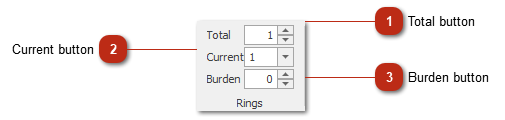
Total button
Specify the total number of rings
Top
Current button
Changes the design canvas to selected ring.
Top
Burden button
Sets the burden of each ring.
Top